Energy trading and risk management (ETRM) software is built to capture trades, manage positions, and handle settlement, but it’s not built to predict the market movements that make a trade worth doing. Upstream of an ETRM platform sits energy forecasting, a power trader’s primary decision aid.
ETRM systems help trading desks make decisions too, of course, but the nature of those decisions is different. Energy forecasting informs the decision-making behind each individual trade. Once trades are captured in the ETRM, risk managers can then visualize and analyze positions across their entire book.
A good workflow recognizes the strengths of each tool. Leading trading desks use best-in-class forecasting rather than what may come bundled with their ETRM, and they take deliberate steps to minimize friction in the handoff.
Leading trading desks use best-in-class forecasting rather than what may come bundled with their ETRM.
ETRM vs. energy forecasting: How trading desks use each software
Commodity trading desks are organized into front-, middle-, and back-office functions. Each has a distinct scope, and each uses both energy forecasting and ETRM systems for different reasons.
Front-office traders rely heavily on forecasting
Traders analyze the market and decide which trades to make according to their views on expected supply and demand, their time horizon, and their risk tolerance. Some traders may have a much higher risk tolerance than others, even within the same firm.
Once they decide which positions to take, they either place trades through their ETRM, or they place them through an independent system like the Intercontinental Exchange and then “capture” or record the trades in the ETRM.
As forecasts evolve, they may adjust their positions and hedges accordingly and visualize those changes in the ETRM. Some ETRMs include forecasting capabilities, but every ETRM’s core competency is bookkeeping and reporting, not forecasting. It’s forecasting that informs bidding strategy, position sizing, risk exposure, and hedge timing.
It’s forecasting that informs bidding strategy, position sizing, risk exposure, and hedge timing.
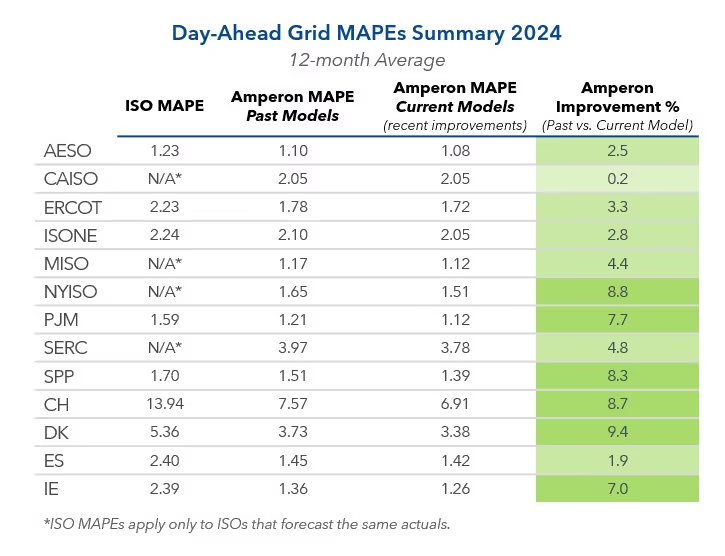
Best-in-class forecasts can improve accuracy 3x versus grid operators and deliver 10x return on investment, so it's usually worth it for traders to leverage dedicated forecasting software rather than relying on whatever comes bundled with their ETRM.
Middle-office risk managers pair forecasting with ETRM-based analysis
Because different traders have different opinions and risk tolerances, risk managers need to see their full book in one place. The ETRM allows them to visualize risk and analyze expected profit and loss (P&L) across their portfolio.
Position management aggregates exposure across books, desks, and delivery points so risk managers can see net length or shortness by hour, month, and hub. ETRMs excel at this level of analysis and more.
Of course, risk managers rely on forecasting, too. They need to not only analyze the risk profile of their existing book, but also judge whether that risk profile matches what they think the market justifies. Seasonal demand forecasting proves especially useful for risk managers trying to judge whether their exposure is appropriate.
Risk managers rely on forecasting, too.
Schedulers may fall in the middle office, or they may have their own “physical” desk designed to operationalize the middle office’s paper positions. This is where the full scope of a trading desk’s decisions translates into actual power flows or commodity movements.
Back-office settlement managers rely heavily on ETRMs
The back office is the accounting and reconciliation team responsible for paying the bills and collecting revenue. Once power has flowed and the grid operator sends a statement, settlement managers check that invoice against what they expected to pay or receive based on information housed in the ETRM.
Even here, forecasting plays a supporting role. Some grid operators take weeks or months to issue statements, so settlement teams often look back at forecast vintages to gauge where the market was going, and thus where they think settlements should fall, before the statement arrives.
Even here, forecasting plays a supporting role.
The back office also handles compliance reporting. Regulatory reporting teams maintain audit trails and provide reports to grid operators, other counterparties, and various government entities in addition to internal teams. All this relies on the ETRM as a system of record.
Reducing friction between ETRMs and forecasting software
A trading desk doesn’t need to rip out its ETRM to get better forecasting. It just needs to select a forecasting partner that can improve accuracy while complementing existing workflows.
Some teams pull in forecasts through an API to feed internal models. Others want them delivered straight into Snowflake where they can be accessed alongside the position and settlement data they already query.
Regardless of the integration method, trading desks should seek best-in-class forecasting to inform their front-office and middle-office decisions. With the right partner, better forecasting is easy to embed into any ETRM workflow.
With the right partner, better forecasting is easy to embed into any ETRM workflow.
Conclusion
ETRM systems cover the full life cycle of a trade, from trade capture and risk reporting to scheduling, settlement, and compliance reporting. Naturally, covering the full life cycle means ETRM systems are not optimized for any one portion. Each leading vendor has its own strengths, but every ETRM’s core competency is acting as a reliable system of record.
Energy forecasting sits primarily upstream of the ETRM, acting as a decision aid for traders. Forecasting can also inform decisions throughout the life cycle of a trade, from scenario analysis to settlement. In each case, energy demand forecasting, renewable asset forecasting, and power price forecasting act as crucial inputs to a trading desk's workflow, but not as a replacement for an ETRM.
Energy forecasting sits primarily upstream of the ETRM, acting as a decision aid for traders.
Additional reading
Power Markets Trading Solutions
Unlocking Intelligent Term Trading and Seasonal Planning
The Evolution of Energy Forecasting
Frequently Asked Questions
What is ETRM software?
Energy trading and risk management software manages the full life cycle of a trade, from deal capture and position tracking to risk analytics, scheduling, settlement, and compliance reporting. ETRM software is built for trade execution and lifecycle management, not for predicting the market movements that determine whether a trade was a good decision in the first place.
What's the difference between ETRM and CTRM software?
ETRM software is scoped specifically to energy commodities like power, gas, and emissions, while commodity trading risk management (CTRM) software covers a broader range of commodities, including metals and agriculture. The two categories share the same core functions, trade capture, risk tracking, and settlement, but ETRM platforms are typically tuned to the scheduling and market structures unique to energy.
Do you need a full ETRM system?
That depends on whether you're missing trade lifecycle management or missing forecast accuracy. Most trading desks already have an ETRM system in place and don't need to replace it, but what often needs improvement is the quality of the demand and price forecast feeding into it.
What are the alternatives to ETRM software?
For teams that don't need full trade lifecycle management, some rely on a combination of spreadsheets, stand-alone risk or position management tools, and forecasting providers rather than a full ETRM platform. This approach can work for smaller or more specialized trading operations, though it typically requires more manual coordination than a fully integrated ETRM system.
What's the difference between Amperon and ETRM software?
Amperon is a forecasting platform, not an ETRM system, so it doesn't manage trade capture, settlement, or compliance reporting. Instead, Amperon delivers AI-driven demand, renewable supply, and price forecasts that plug into an existing ETRM through an API, flat file exports, or a native Snowflake integration, improving the forecast input an ETRM depends on without replacing the system itself. Amperon’s best-in-class forecasts deliver 3x better average accuracy than US grid operators and up to 10x return on investment.

.svg)






























%20(3).png)
%20(2).png)
%20(1).png)




.png)


.avif)



.avif)
.avif)

.avif)
.avif)
%20(15).avif)

.avif)


.avif)